GitBook migration
This guide describes the process of converting GitBook docs into Docusarus. Luckily, they are both using Markdown to render content, which makes the process a bit easier.
1. Setup Docusaurus Repository
Start by selecting "Import repository" option in GitHub and put the URL of the starter repository (https://github.com/ChainSafe/documentation-starter). Update docusaurus.config.js and package.json configs with proper naming and urls.
2. Export GitBook Docs to Markdown
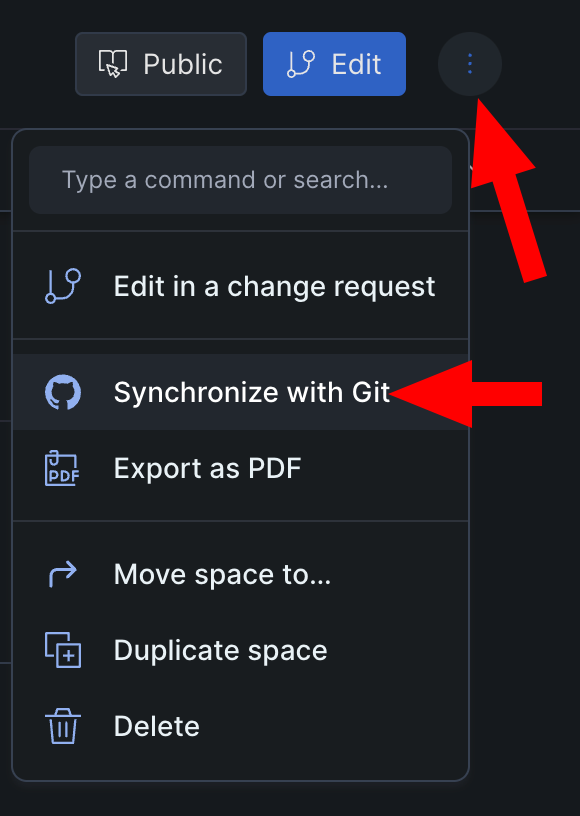
You can do this by syncing the GitBook site with GitHub. Choose the 3 dots icon in the top-right corner of your GitBook site and choose the "Synchronize with GitHub" option. Connect your GitHub account if you haven't already and select a GitHub repository where you want your GitBook site to export. Make sure there are no branch protection rules in place and that priority is selected "GitBook to GitHub".
3. Migrate content
Copy all .md files from exported GitHub repository into your new Docusarus repository into /docs directory.
Delete SUMMARY.md file because in Docusaurus it is automatically generated (Read more how to modify sidebar: https://docusaurus.io/docs/sidebar/autogenerated#autogenerated-sidebar-metadata).
If you ran yarn start in the new repository you should see your documentation homepage. There will probably be some unsupported markdown features.
4. Fix unsupported Markdown features
Embedded Video or Playlist links
| GitBook | Docusaurus |
|---|---|
{% embed url="<youtube video url>" %} | Go to the source (YouTube, Vimeo), choose to share embedded and paste raw html code in markdown |
Change anchor names
| GitBook | Docusaurus |
|---|---|
# Heading <a href="#heading2" id="heading2"></a> | # Heading {#heading2} |
Description sections to call-outs
| GitBook | Docusaurus |
|---|---|
--- | :::info |
Syntax highlight for non-default languages
Docusaurus by default supports only this set of language highlights. In order to add highlight support for other popular languages docusaurus.conf.js needs to be extended with the desired languages list:
themeConfig:
    ...
    prism: {
        ...
        additionalLanguages: ['csharp'],
    }
    ...
More information can be found here.
Code blocks line numbering
| GitBook | Docusaurus |
|---|---|
{% code lineNumbers="true" %} | showLineNumbers |